In the Sources section, you get a look behind the scenes of the AI: you find out which information basis the answers about an entity (e.g. a brand) or a specific domain are generated from. Here you see exactly which websites the models draw on to answer the prompts and in which context they are used.
Sources Table
The Sources table shows which websites and URLs the AI draws on to answer questions about a brand or entity. This makes it clear which external information the AI answers are based on and where optimizing your presence is strategically worthwhile.
The tabs at the top of the table let you switch between three views:
- URLs: The complete, specific URLs that serve as sources
- Hostnames: The websites at host level (e.g. www.youtube.com, www.reddit.com)
- Domains: The top-level domains (e.g. youtube.com, reddit.com)
AI Deep Dives
Above the filter bar, two AI-powered analyses are available for the Sources section that combine real SISTRIX data with AI interpretation. You can also ask further questions directly within the Deep Dives via chat.
Deep Dive: Own Citations
This Deep Dive shows how many of the cited contents come from your own sources, which pages are used particularly often, and which directory collects the most citations.
Deep Dive: External Citations
This Deep Dive shows how many of the contents come from third-party sources, which pages are the most frequently cited third-party sources, and which type of content brings the most mentions.
URLs View
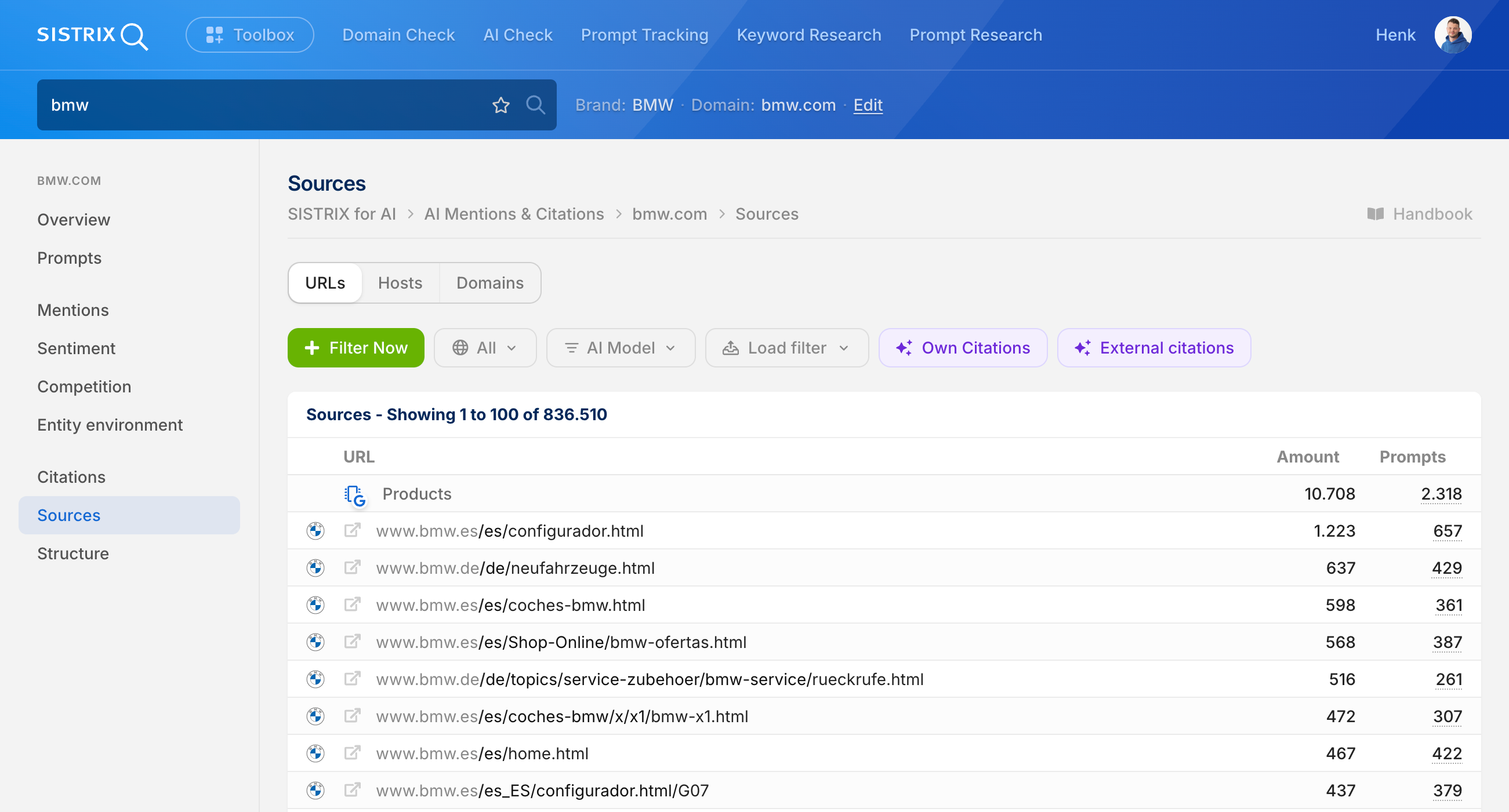
This view shows the complete, specific URLs that the AI uses as sources for answers about an entity.
Icons
The favicon (website icon) is shown next to each source. These icons help you identify sources visually at a glance, for example the YouTube logo, the Wikipedia “W”, or the Reddit icon.
Entries such as “Search,” “Products,” or “Google Local” show a colorful Google icon instead of a classic favicon. These mark information the AI draws directly from the Google ecosystem (e.g. Knowledge Graph, Google Shopping, or Google Local Business) without linking to an external URL.
URL
The exact web address that serves as the source. This shows not just the domain, but the full path to the specific page.
Example: www.handytick.com/blog/the-10-most-popular-free-smartphone-games/
Count
How often this specific URL was used as a source in the analyzed AI answers. The higher the number, the more relevant this particular page is to the AI.
Prompts
Shows how many different prompts this URL was used as a source for. Many prompts indicate broad relevance, few prompts suggest a niche focus.
Strategic Use
- Content Optimization: Which pages does the AI draw on? These can be specifically optimized.
- Competitor Analysis: Which specific competitor pages are cited frequently?
- Content Gaps: Which URLs are missing? Where should new content be created?
Hostnames View
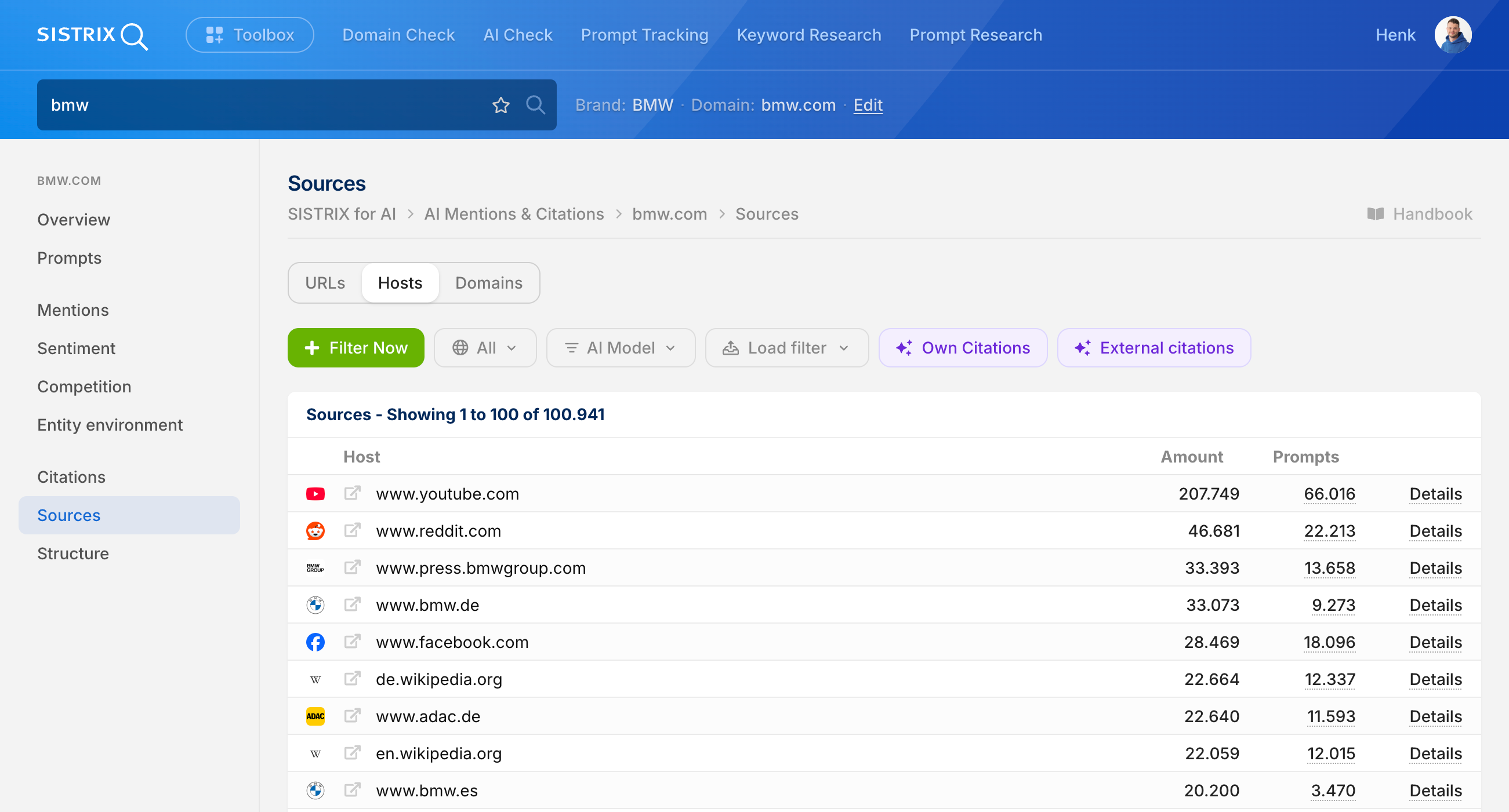
This view groups sources by website (hostname) and shows which platforms the AI uses overall as an information source.
Hostname
The website at host level, without a specific path.
Examples: www.youtube.com, www.reddit.com, en.wikipedia.org
Count
How often this website was used as a source overall (across all URLs). Shows the overall relevance of a platform for the entity.
Prompts
How many different prompts this website (any URL on this domain) was used as a source for. Shows how broad the topical coverage of this platform is.
Details
Clicking “Details” takes you to the Source URLs page for the respective hostname. There, all individual URLs of this hostname are shown along with their respective count and associated prompts.
Strategic Use
- Platform Priority: On which websites is a presence important?
- Channel Strategy: Are YouTube, Reddit, or Wikipedia used more often than your own site?
- Presence Check: Is the brand actively represented on the most important source platforms?
Domains View
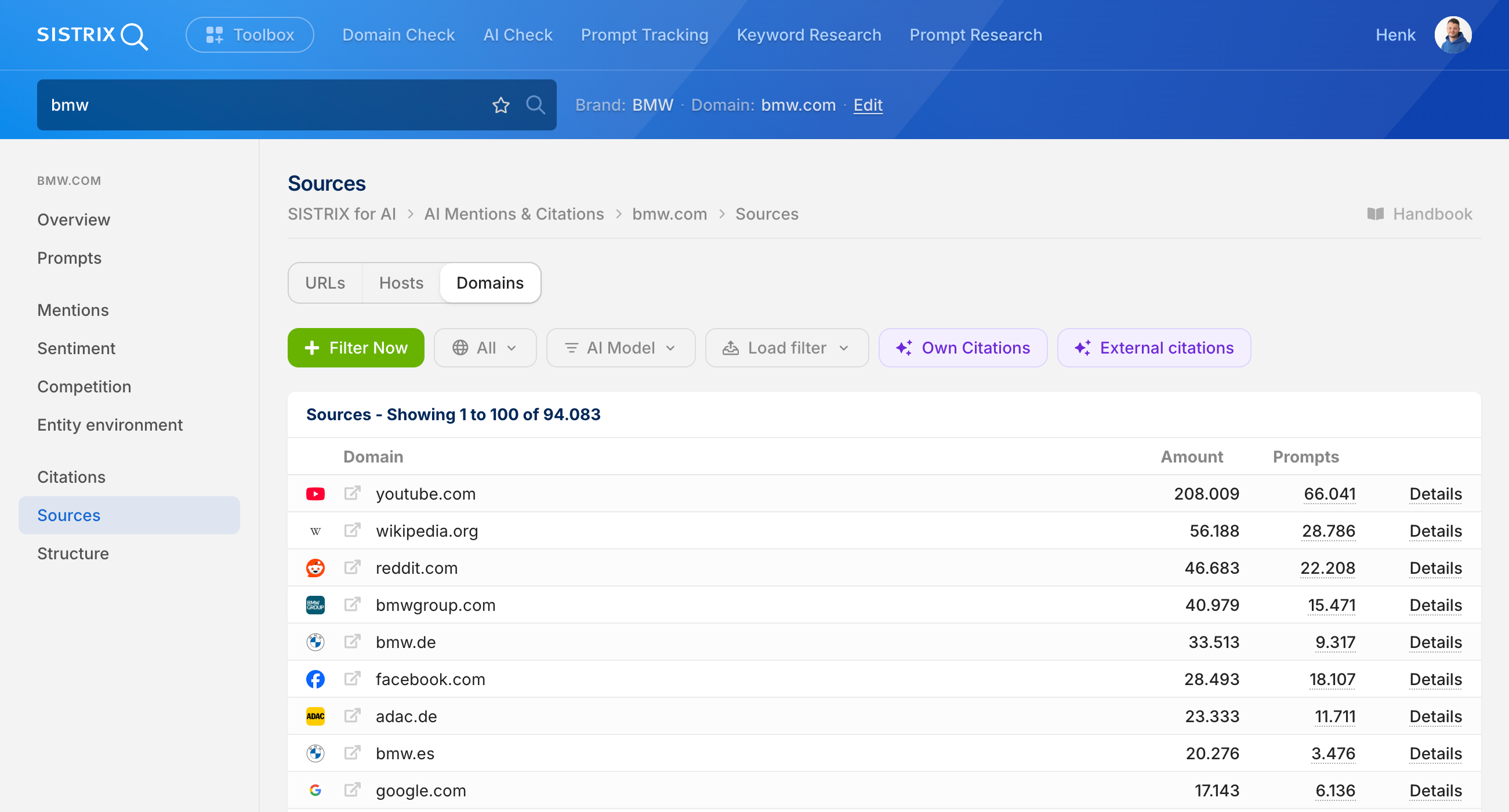
The highest level of aggregation: here, the top-level domains are shown, regardless of subdomain or specific host.
Domain
The top-level domain without subdomain or host.
Examples: youtube.com (instead of www.youtube.com), wikipedia.org (combines en.wikipedia.org and de.wikipedia.org)
Count
How often this domain was used as a source overall (across all subdomains and URLs).
Prompts
How many different prompts a URL from this domain was used as a source for.
Details
Clicking “Details” takes you to the Source URLs page for the respective domain. There, all individual URLs of this domain (across all hostnames) are shown along with their respective count and associated prompts.
Strategic Use
- Big Picture: Which major platforms dominate as sources?
- Domain Authority: How important is your own domain compared to reddit.com, youtube.com, etc.?
- Strategy Planning: Which major platforms are worth investing in long-term?
Distribution (domain search only)
When searching for a domain (instead of a brand/entity), the Distribution shows the percentage split of mentions across all tracked AI models.
- All found mentions of the domain = 100%
- The Distribution shows how this 100% is split across the various AI models
Strategic Use
- Model Presence: Which AI models is the domain strongly/weakly represented in?
- Optimization Focus: Should the focus be on specific AI formats?
- Trend Detection: Is visibility shifting between different AI models?
Next Steps
Use the Sources data strategically:
- Prompts: See at which specific questions your sources (or your competitors’) are used
- Environment: Understand the topical context of your source mentions
- Tracker: Track the development of your most important sources over time