


With a single prompt, the domain’s highest-traffic URLs are identified, comprehensive keyword lists with search volumes and rankings are retrieved, and a prioritised keyword strategy is created based on this data, with a maximum of six keywords per page, including a gap analysis for keywords that do not rank.
| Time required | Time saved | Difficulty | Uses |
|---|---|---|---|
| 5-10 Min. | ~3-4 Hours | ●●○○○ | Ongoing / Pitch / Audit |
Benefits
- A complete keyword strategy at the touch of a button: Instead of manually exporting rankings, prioritising URLs and assigning keywords, the model handles the entire process, from domain analysis to the finished strategy table.
- Immediate competitive advantage: The integrated gap analysis reveals which relevant generic keywords the domain is not yet ranking for and immediately provides concrete recommendations for action.
- Scalable for agencies: The same prompt works for any domain and any section of a website. Client onboarding, keyword audits and quarterly updates can be delivered in minutes rather than hours.
- Presentation-ready output: The result is a structured Excel file with three sheets (overview, strategy, gap keywords), ready for immediate use in presentations and briefings.
Prompt
Example prompt
Analyse the domain [domain.com] with the SISTRIX MCP server and develop a full keyword strategy for the category [/category]. Proceed as follows:
Identify the URLs with the highest traffic in the category [/category] by aggregating the ranking keywords by search volume and sorting the URLs by the total traffic potential.
Create a keyword list with search volume, current ranking and click potential for each of the top URLs. To do this, use SISTRIX keyword data.
Carry out a gap analysis: identify generic keywords with a high search volume for which the domain currently does not rank or only ranks very little (position > 10).
Use this info to create a prioritised keyword strategy: pick a maximum of 6 keywords per URL, prioritised by search volume and ranking quality. Assign gap keywords to the fitting target URL and add recommended actions.
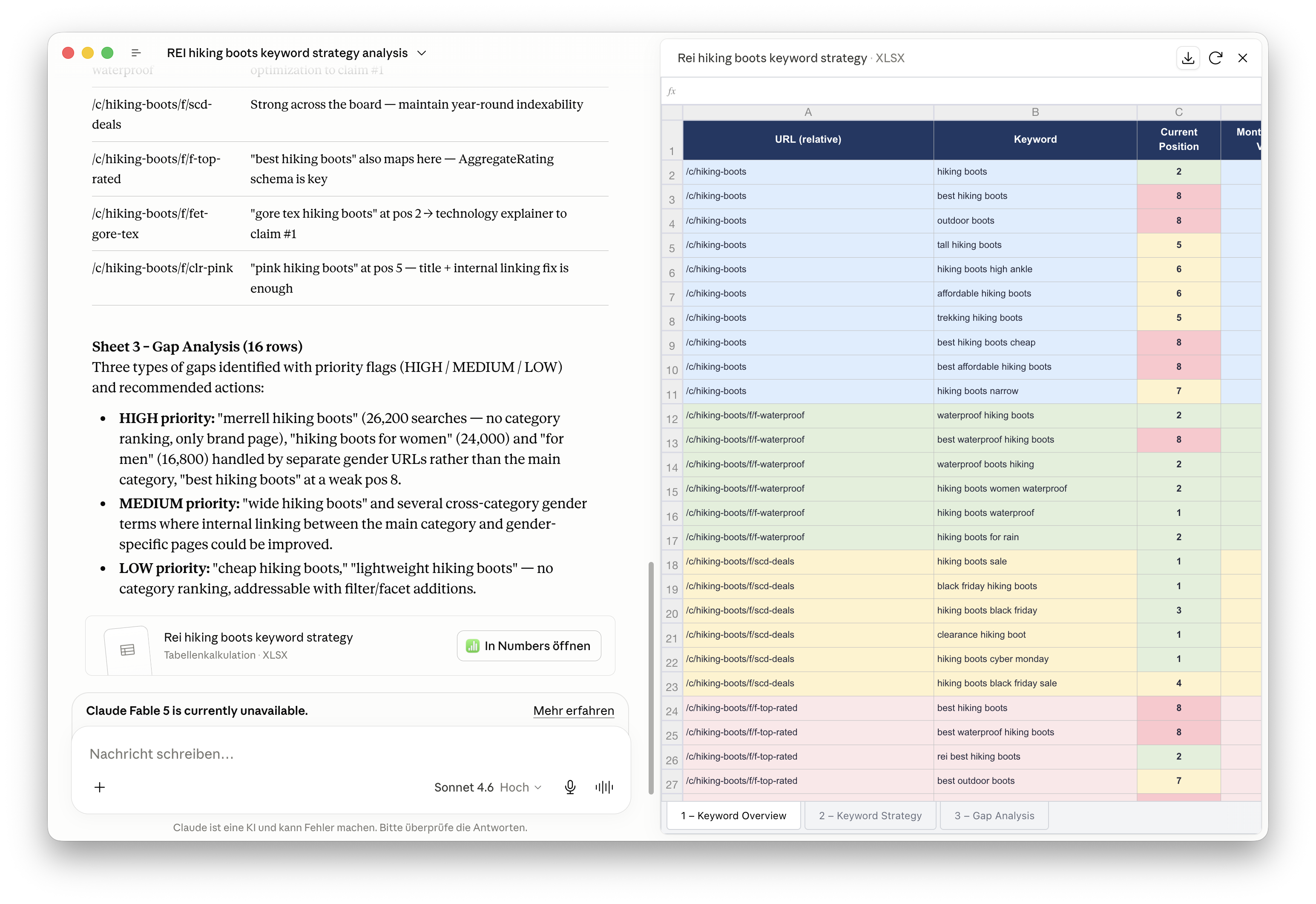
Summarise all results as a structured Excel file with three sheets: (1) complete keyword overview, (2) final strategy with a maximum of 6 keywords per page, (3) gap keywords with appropriate measures.
Process
Step 1: Retrieve keyword rankings for the site
The model retrieves all keywords for which URLs in the selected range rank via the SISTRIX MCP server, filtered by URL regex (e.g. /vacuum-cleaner). For each keyword, the position and associated URL are returned. A URL frequency analysis is generated from this data to identify the pages with the highest traffic.
Step 2: View search volume for all keywords
For all identified keywords, search volume and click potential are retrieved using the keyword_seo_traffic tool. The model prioritises the keywords for each URL based on search volume and selects the most strategically valuable ones.
Step 3: Gap analysis
The domain_ideas tool and keyword_seo are used to identify high-potential generic keywords for which the domain has no ranking or a poor ranking (position > 10 or no listing). The model compares search volume, current ranking and semantic relevance to existing URLs.
Step 4: Compile a keyword strategy and export to Excel
Das Modell erstellt eine finale Keyword-Strategie: Pro URL werden maximal 6 Keywords ausgewählt, priorisiert nach Suchvolumen und Ranking-Qualität. Gap-Keywords erhalten Handlungsempfehlungen (z. B. „Content-Seite anlegen“, „On-Page optimieren“). Der gesamte Output wird als strukturierte Excel-Datei mit drei Sheets exportiert.
Output / Result
Das Ergebnis ist eine strukturierte Excel-Datei (.xlsx) mit drei Sheets:
| Sheet | Content | Use case |
|---|---|---|
| 1 - Overview | All URLs with a full keyword list, search volume, rankings, clicks and type (brand kw / gap) | Base for briefings, audits and internal documentation |
| 2 - Strategy | Final selection: max. 6 keywords per URL, prioritised by volume and ranking | Direct template for on-page optimisation, title tags or content briefings |
| 3 - Gap keywords | Generic keywords without or with poor ranking, including recommended actions | Base for content planning, new landing pages and growth potentials |
Combinations and variants
Combination: competitor analysis
Use same workflow for 2-3 competitors and their keyword positions to compare it to your own domain. This way, you can develop directly comparable strategies and concrete fields of potential.
- Competitor comparison: Use the same prompt for 2-3 competing domains and identify keyword overlaps, as well as gaps.
- Automatic reporting: Repeat the workflow monthly and compare the rankings to the previous month. This can create the basis for continuous SEO reporting.
- Content briefing generator: Use gap keywords directly as output for content briefs. The model creates structured briefings automatically from the gap list for new landing pages or blog articles.
- Multi-domain analysis: Analyse multiple domains or subdomains side-by-side and check the keyword strategies for cannibalism or synergies.
Stuck? Our support team can help with setting up the SISTRIX MCP server and answer questions about the usage of Claude or ChatGPT. Contact support
Test SISTRIX for Free
- Free 14-day test account
- Non-binding. No termination necessary
- Personalised on-boarding with experts





