
Identify technical SEO mistakes within minutes instead of manually clicking for days: the model reads the complete Onpage crawl of a domain through the SISTRIX MCP server and delivers a prioritised overview of all technical SEO errors via five topic clusters and 26 factors, including affected URLs and concrete measures you can immediately take on.
| Time needed | Time saved | Difficulty | Uses |
|---|---|---|---|
| 20-30 min. | 6-8 hours | Medium | Tech analysis & pitch |
Uses
- Immediate overview: of all critical errors without having to manually scroll through hundreds of lines.
- Priorisation based on degree of severity: Error, Warning, and Notice instead of an unsorted list.
- Directly usable list of affected URLs: including linked source pages, ready for use for developer tickets.
- Comparison of timelines: shows based on the crawl history if taken measures are actually working.
- All-encompassing audit without additional efforts: complete onsite-tech audit without further crawling or manual data evaluation.
How an onsite audit should be structured
A complete onsite audit covers five topic clusters with a total of 26 factors, that can all be directly retrieved via the SISTRIX MCP server. All retrievals are carried out via project_onpage for the relevant chosen project.
- 🔍 Crawling & Indexing: Sitemap.xml, URL redirection, 404 errors, canonicals, robots meta tag, crawling blockades, SSL certificate, Hreflang
- 📄 Content: Content quality and quantity, H-tags/headings, title, description, alt-description, placeholder text
- 🔗 Website & URL structure: Canonical URL, internal links, descriptive URL, broken links, click depths from starting page on, URL hygiene, mixed content
- ⚡ Performance: Picture formatting and size, JavaScript & CSS, loading times, data sizes
- 📣 Social & Meta: Open Graph
26 factors in 5 topic clusters, all directly retrievable with the SISTRIX MCP server without the need for manual clicking through the overview. The specific SISTRIX retrievals (issue keys) per factor can be found in the separate reference table.
Prompt
“Use my SISTRIX On-Page project [Project X]. Use this to create an Excel spreadsheet in line with our brand guidelines: an overview sheet listing all errors, warnings and notices by topic area (Crawling & Indexing, Content, Website & URL Structure, Performance, Social & Meta), including the number, type, priority (1–3), a status column and specific recommendations for action for each error type. Also, add a separate tab for each error type containing the affected URLs in detail, linked from the overview tab.”
Process
- Choose project: Simply name an already existing SISTRIX Onpage Project for the domain you want to check, for instance “Project X”. The model will automatically find the relevant data record.
- Pull crawl overview:
project_onpage(view: overview)delivers the error, warning and notice numbers in a historical timeline. - Retrieve all issues types:
project_onpage (view: crawl)delivers the complete breakdown for the 105 potential error types. Usually, the model does this automatically without you having to specifically ask it to. - Pull the relevant URLs per factor:
project_onpage(view:issue, issue...)delivers the affected URLs with the fitting issue key from the five topic section above, for instancepage_not_found,missing_h1,thin_content,noindex, oropen_graph_incomplete. - (optional) Prioritise: The model uses the amount, URL score and error type to delineate priority and recommendation for action.
💡Practical tip: For very large domains, it is worth only requesting the Errors first (project_onpage view=crawl, then filter for type=error) and only afterwards continue with the Warnings and Notices.
Output / Result
Breakdown of errors by topic area, live example: sistrix.de
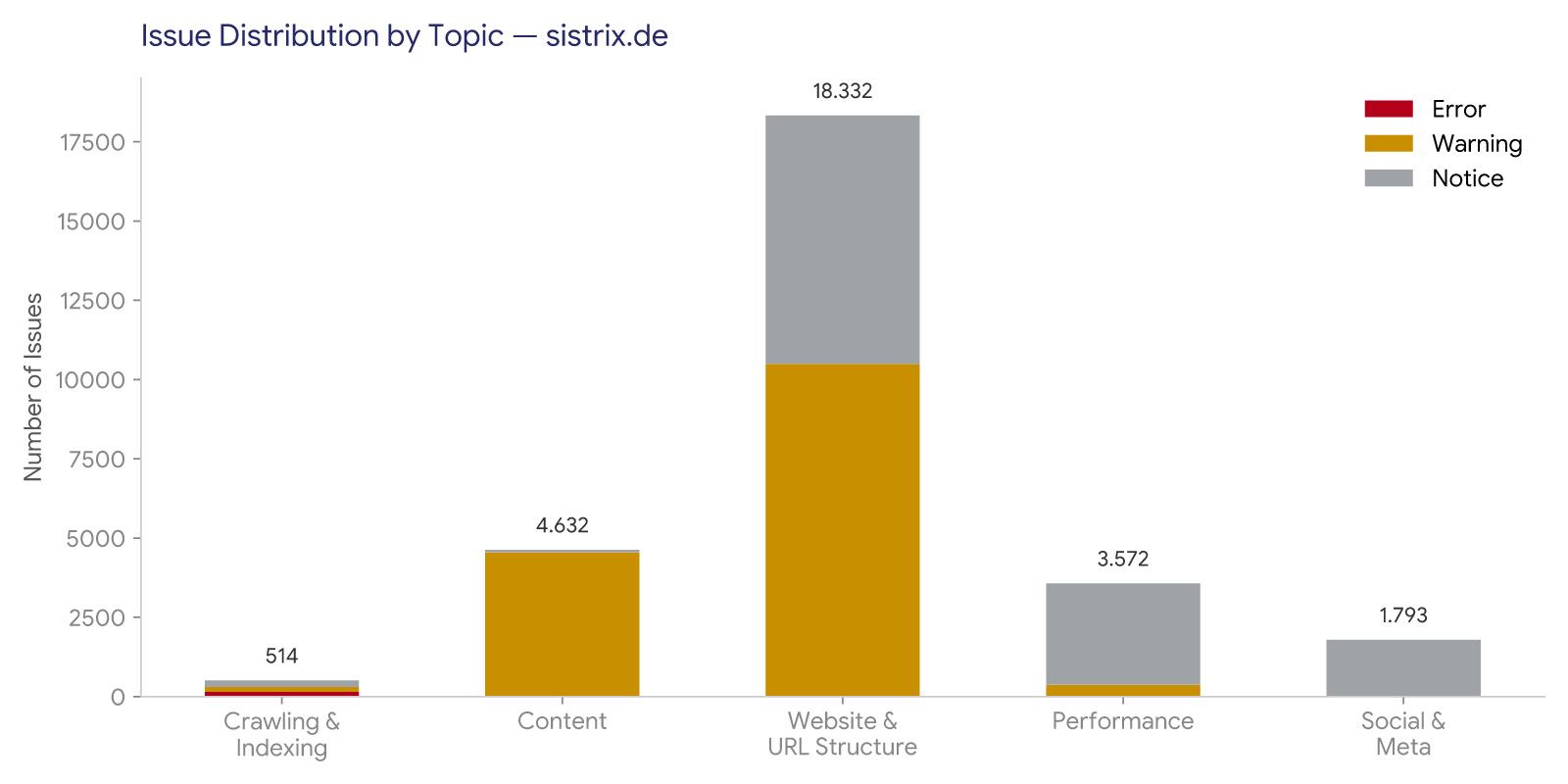
Data retrieved in real time via the SISTRIX Onpage project (project “sistrix de”, 38,765 pages crawled, 168 errors, 15,520 warnings, 13,155 notices):
| Type of error | Amount | Type | Priority | Recommended action |
|---|---|---|---|---|
| SSL certificate expiring | 1 | Notice | 1 | Already expires on 21/08/2026: renew in time, otherwise browser warnings and loss of trust are likely. |
| 404, page not found | 73 | Error | 1 | Set up 301 redirects to suitable target pages or update internal links to the live URL; clean up the source pages identified in the drilldown first. |
| Image not found | 71 | Error | 1 | Replace missing image files or remove the |
| Server error 500 | 4 | Error | 1 | Escalate immediately to development: server errors completely block crawling and the user experience. |
| Title completely missing | 1 | Error | 1 | Add the title tag. With only 1 URL affected, this is done in a few minutes: a classic quick win. |
| H1 missing | 5 | Warning | 1 | Add the H1 tag; the small number of pages also makes this a quick win. |
| Incorrect URLs in sitemap | 15 | Error | 2 | Clean up the sitemap.xml: only include live, accessible, indexable URLs, then resubmit it to GSC. |
| Title too long | 620 | Warning | 2 | Shorten titles to around 55–60 characters, placing the most important keyword at the start, ideally via a template rule rather than manual editing. |
| Description missing | 594 | Warning | 2 | Add meta descriptions, prioritizing category and blog templates first, then individual pages. |
| Thin content (< 250 words) | 51 | Warning | 2 | Expand the content of the pages, consolidate them, or set them to noindex if they have no independent search value. |
| H1 identical across multiple pages | 50 | Warning | 2 | Assign an individual H1 to each page to avoid duplicate-content signals. |
| Alt attribute missing | 213 | Warning | 2 | Add alt attributes at a technical level; this is usually a template or CMS fix rather than manual maintenance. |
| Canonical points externally | 43 | Warning | 2 | Check whether the external canonical is intentional, e.g. for syndication purposes; otherwise correct it to a self-canonical. |
| Image too large | 335 | Warning | 2 | Compress images or switch to WebP, prioritizing high-traffic pages. |
| Alt attribute empty | 2.406 | Warning | 3 | Fill in alt texts gradually, prioritized by URL score or traffic rather than all at once. |
| Only 1 inbound link | 98 | Warning | 3 | Strengthen internal linking from thematically relevant pages. |
| Broken external links | 8.950 | Warning | 3 | Group by target domain and clean up or remove in batches. The high number suggests outdated link lists. |
| Noindex set | 151 | Notice | 3 | Check whether all URLs were deliberately excluded; an accidental noindex completely prevents rankings. |
| Open Graph incomplete | 1.467 | Notice | 3 | Add OG tags such as title, image, and url so that social shares and AI-generated snippets are displayed correctly. |
| Duplicate content (fuzzy) | 103 | Notice | 3 | Consolidate similar pages or point them to the main version via a canonical tag. |
⚠ Warning: For large domains (over 30.000 URLs) there may be especially many “defective external links”, in our case 8.950. Ideally, filter by Errors first and prioritise Warnings or Notices later.
Combinations and Variations
★ Combination: Combine with the Content Audit Use Case if you only want to check specific URL areas for content instead of a deeper technical analysis, such as a blog or resources.
- Traffic-light-reporting: Only retrieve Errors as a compact red-yellow-green overview to send to clients
- Progress tracking:
project_onpage(view: overview)to compare across multiple crawl datasets to test the effect of actions taken - New-client-pitch: Focus only on the most severe 5 to 10 Errors to quickly show your further value in an initial consultation.
Still stuck? Our support team can help with the setup of the SISTRIX MCP server and answer questions about the usage with Claude or ChatGPT. Contact support
Test SISTRIX for Free
- Free 14-day test account
- Non-binding. No termination necessary
- Personalised on-boarding with experts