


Complete SEO Initial Analysis in just a few minutes: Claude automatically retrieves the visibility index, top keywords, competitors, and quick wins via the SISTRIX MCP Server and delivers a prioritised keyword strategy as a ready-to-use export.
| TIME REQUIRED | TIME SAVINGS | DIFFICULTY | APPLICATION |
|---|---|---|---|
| 5–10 mins | ~2 hours | ●●○○○ | Onboarding / Pitch |
Benefits
- Lightning-fast start for any new domain: Instead of hours of manual clicking, the SISTRIX MCP Server delivers all relevant SEO metrics structured and interpreted in a single run.
- Pitch-ready analysis with zero prep time: Visibility Index, competitive landscape, and keyword gaps are automatically combined — ideal as a foundation for acquisition conversations or onboarding calls.
- Prioritization instead of data overload: The model weighs the results and derives a clear roadmap: quick wins first, strategic measures after. No endless tables — just actionable recommendations.
- Reproducible for any domain: The prompt works for any domain without modification. Once set up, the analysis can be scaled for all client onboardings.
Prompt
Example Prompt
Analyze the domain [domain.com] as a new client initial analysis using the SISTRIX MCP Server:
- Current Visibility Index and market positioning
- Top 20 keywords by search volume
- The 5 strongest SEO competitors
- Keywords for which competitors rank but the domain does not
- Quick wins: keywords ranking in positions 5–15
Summarise the results as a prioritised keyword strategy with concrete measures and a timeline.
Workflow
Step 1: Retrieve visibility index and market positioning
The SISTRIX MCP Server fetches the domain’s current visibility index and supplements it with the ranking distribution across all Google results pages (pages 1–10). The result immediately reveals how organically prominent the domain is and where the greatest potential lies.
Step 2: Identify top keywords by search volume
The keyword_domain_seo tool retrieves the 20 highest-traffic keywords for the domain. The model analyses patterns: Which categories dominate? Are primarily brand or non-brand keywords ranking? Which URLs perform particularly well?
Step 3: Identify and categorise competitors
The domain_competitors_seo tool delivers the five domains with the highest keyword overlap. The model categorises them strategically — retailers, marketplaces, comparison portals, trade publications, or community platforms — and draws conclusions about where structural content gaps exist.
Step 4: Derive opportunities and quick wins
domain_opportunities delivers keywords with the highest growth potential (gain score). In parallel, rankings in positions 5–15 are filtered using keyword_domain_seo. The model identifies cannibalisation issues, incorrectly ranking URLs, and immediately actionable optimisation opportunities.
Step 5: Compile and export the roadmap
The model condenses all results into a prioritised keyword strategy with concrete measures, divided into immediate, short-term, and medium-term priorities. The export is delivered as an .xlsx file with 6 structured worksheets, ready for use in client presentations or internal briefings.
Output / Result
At the end of the workflow, the SISTRIX MCP Server delivers a complete SEO initial analysis in two formats:
1. Interactive dashboard (directly in chat) — All results are displayed inline: KPI cards, ranking distribution chart, keyword tables, competitor cards, opportunity list, and roadmap.
2. Excel export (.xlsx, 6 worksheets) — Cleanly formatted, color-coded, and prepared for direct use in client meetings.
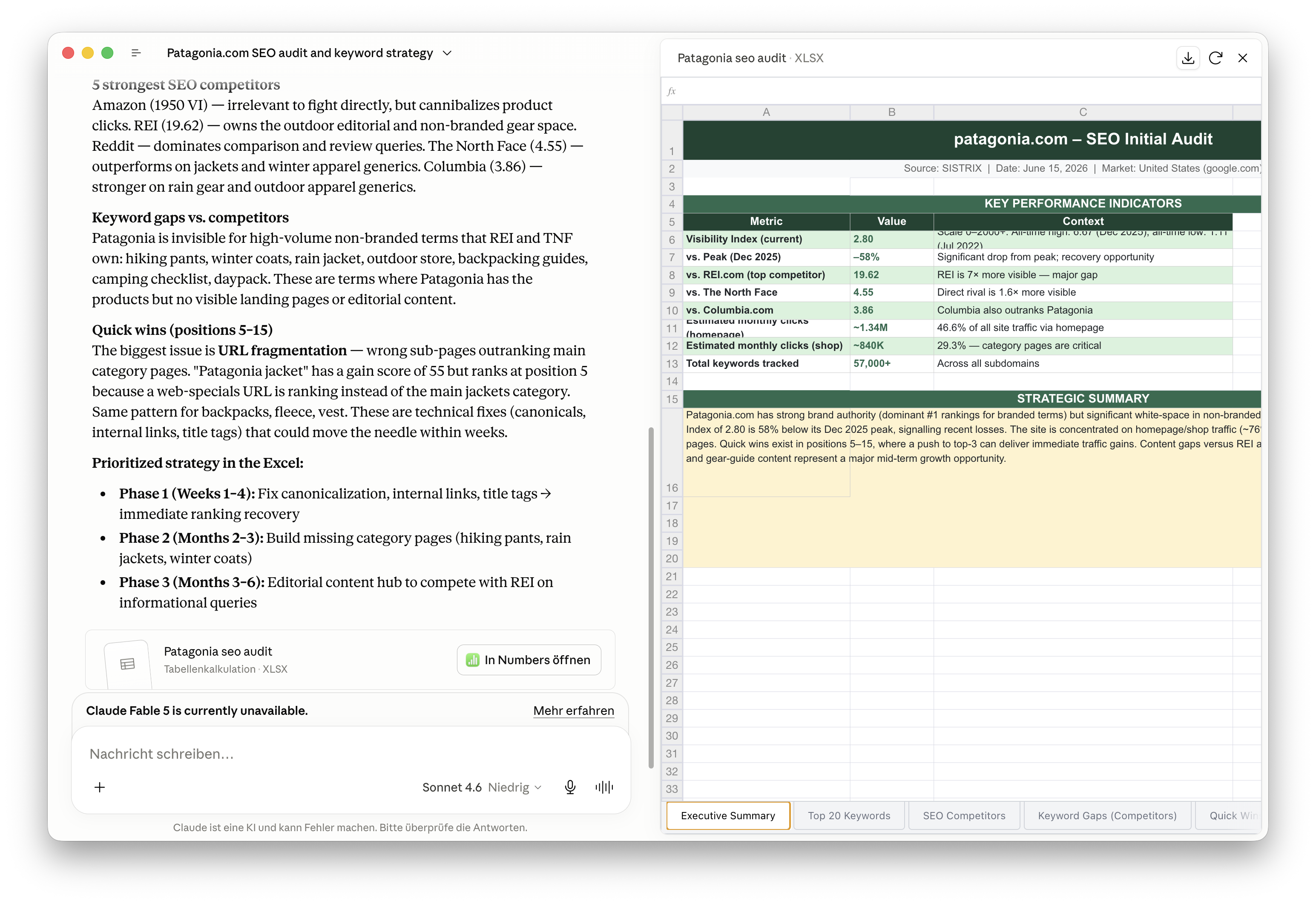
| Spreadsheet | Contents |
|---|---|
| 1 – Overview | Visibility index, KPIs, ranking distribution |
| 2 – Top 20 keywords | Keywords, positions, URLs, categories |
| 3 – Competitors | Top 5 with strategic classification |
| 4 – Opportunities | Keywords prioritised by gain score |
| 5 – Quick Wins | Items 5–15: causes and actions |
| 6 – Keyword-Roadmap | Immediate / Short-term / Medium-term / Long-term |
Combinations and Variants
Combination: Competitor deep-dive
After the initial analysis, a dedicated keyword analysis can be launched for each of the 5 competitors. The model directly compares overlapping keywords and identifies the topic areas where the domain should focus on catching up.
- Variant: Fully automated client report — Export the initial analysis directly as a PDF or PowerPoint and send it unchanged as an onboarding document.
- Variant: Monthly monitoring — Run the same prompt monthly and have the visibility index and quick-win list updated automatically.
- Variant: Industry benchmark — Analyze multiple domains from the same industry in parallel and create a comparative positioning overview.
- Variant: Content gap analysis — Use the opportunities list as the basis for automatically generating content briefs.
Stuck? Our support team can help with the SISTRIX MCP Server setup and answer questions about using it with Claude or ChatGPT. Contact support.
Test SISTRIX for Free
- Free 14-day test account
- Non-binding. No termination necessary
- Personalised on-boarding with experts





