
In this article you wil discover important MCP use cases and examples for your daily SEO work, a step-by-step-setup tutorial and the changelog with all updates.
- What is the SISTRIX MCP server?
- Setting Up the MCP Server
- The SISTRIX MCP Server in Practice
- Initial SEO Analysis
- Content Gap Analysis
- Content Audit
- GEO Analysis
- Automatic Keyword Strategy
- Topic Prompt Research
- Prompt Research Current Status
- Onsite Audit
- Changelog
- Frequently asked questions about the SISTRIX MCP server
What is the SISTRIX MCP server?
MCP stands for Model Context Protocol, an open standard that allows AI assistants to access external data sources, such as SISTRIX, directly. The SISTRIX MCP Server connects chatbots like Claude or ChatGPT to SISTRIX data in real time: no manual exports, no tool switching, no API knowledge required.
You ask a question in the chat and the assistant fetches the answer directly from SISTRIX.
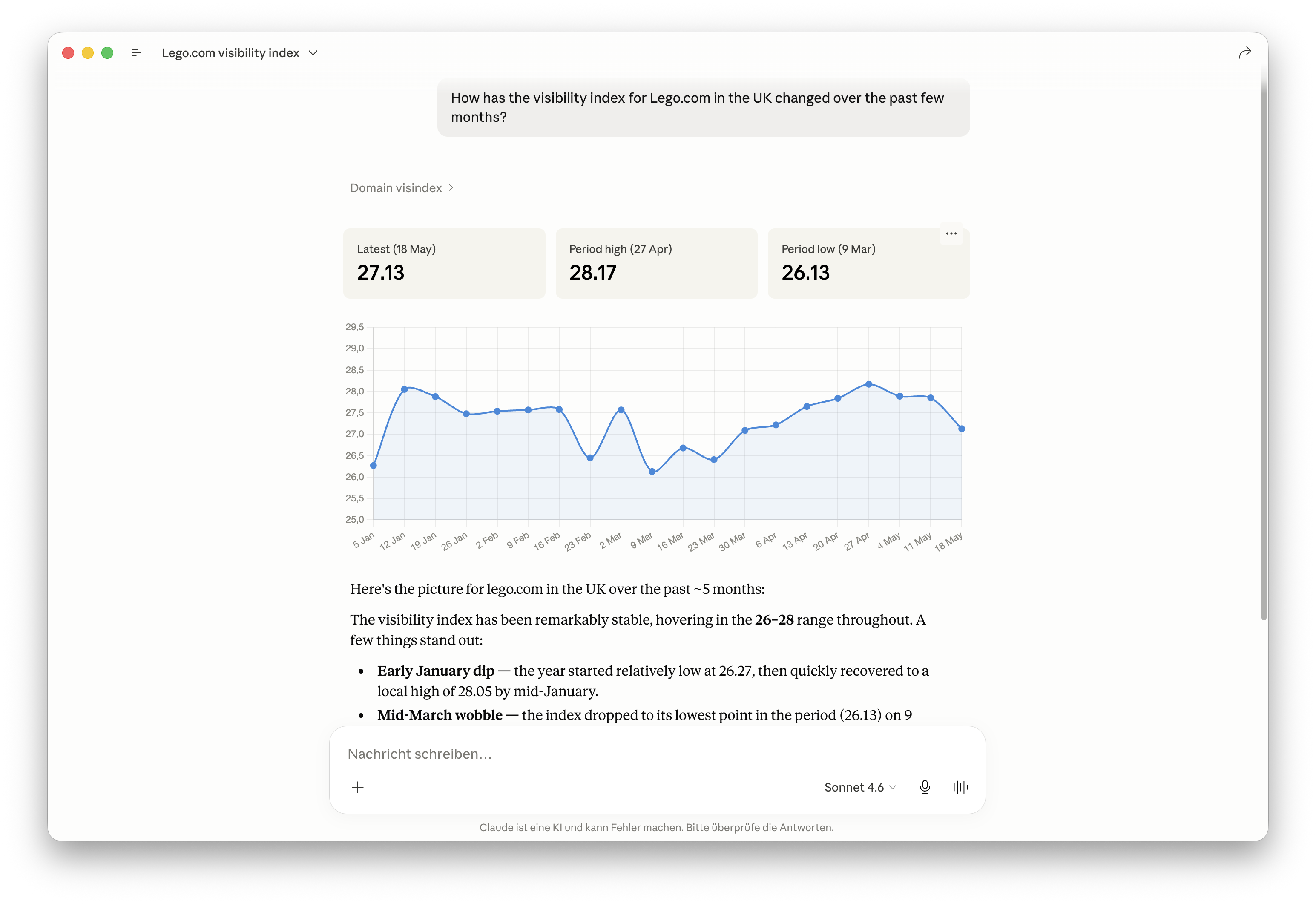
What this means in practice: analyses that previously required multiple tabs, an export, and a bit of patience can now be done with a simple text input. It’s faster, more direct, and improves your workflow.
These two things make it even better:
- MCP requests do not consume API credits. The SISTRIX MCP Server runs on its own infrastructure, completely independent of your regular credit quota.
- No API key required. The OAuth connection works with any SISTRIX account, regardless of your subscription plan.
Setting Up the MCP Server
The SISTRIX MCP Server currently works with Claude and ChatGPT. Setup is done in just a few steps.
Step-by-Step Guide
Instructions for Claude and ChatGPT, OAuth connection for all SISTRIX accounts, API key option available from the Plus plan onwards.
→ sistrix.com/api/connection-to-chatbot-ai/
Tip: To ensure the chatbot accesses SISTRIX data reliably rather than searching the web, briefly mention at the start of your prompt: “Use the SISTRIX MCP Server.”
The SISTRIX MCP Server in Practice
The following use cases show concretely what is possible with the SISTRIX MCP Server and how it makes daily SEO work faster and more efficient. Each article includes example prompts that can be adopted and adapted directly.
Initial SEO Analysis
Visibility Index, top keywords, competitors, and quick wins in a single prompt: the SISTRIX MCP Server delivers a complete initial SEO analysis for any domain, ready to pitch and exported without any manual preparation.
Content Gap Analysis
Which topics are competitors covering that your own domain is not? The SISTRIX MCP Server compares keyword profiles, clusters the gaps by topic, and delivers a prioritised content plan directly.
Content Audit
Evaluate, cluster, and prioritise all URLs of a domain: the SISTRIX MCP Server processes rankings, traffic potential, and technical signals in a single pass and provides concrete action items for each page.
GEO Analysis
How visible is your brand in AI responses? Analyse prompts, citations, entities and competitor clusters at a glance, with SISTRIX AI entity data straight from the MCP.
Automatic Keyword Strategy
Identify the traffic-heaviest URLs of a domain, retrieve full keyword lists and create a keyword strategy from them, including gap analysis, with just one prompt.
Topic Prompt Research
Understand the actual demand surrounding a topic from the point of view of AI chatbot users and specifically tailor your own product range accordingly: the model retrieves all topics for a search term via the SISTRIX MCP server, clusters it by topic and filters the clusters with reference to the real product.
Prompt Research Current Status
Measure brand visibility in AI search, discover competitor gaps and identify fitting PAA questions from the classical Google search: the model uses the SISTRIX MCP server to conduct a prompt analysis, including prioritisation for content and GEO.
Onsite Audit
Identify technical SEO errors within minutes instead of having to manually click for days: via the SISTRIX MCP server, the model reads the Onpage crawl of a domain and delivers a prioritised overview of technical SEO errors, including concrete immediate recommended actions.
Changelog
The SISTRIX MCP Server is continuously being developed: new features, additional data points, more supported clients. All changes are documented in the changelog.
Changelog
A chronological overview of all updates: new features, resolved issues, and extensions to the SISTRIX MCP Server.
Frequently asked questions about the SISTRIX MCP server
Which AI clients are supported? The SISTRIX MCP server works with Claude and ChatGPT. Gemini and Microsoft Copilot are not supported as of yet. As soon as these platforms offer the integration of MCP servers, SISTRIX will be ready. For combined packages, like Langdock, the availability of all tools is dependent on the corresponding configuration of the platform. If you're having issues, feel free to contact the SISTRIX Support. |
Which SISTRIX data can the MCP server access, and which is excluded? The MCP server has access to keyword rankings, Visibility Index, keyword lists, competitor data and the GEO & Visibility Tools (prompt research, AI check, prompt tracking). It cannot access Google Search Console data, even if you set up a GSC connection within SISTRIX. Since SISTRIX only hands over the GSC data and doesn't process it, a direct GSC-MCP connection is more sensible. If you need help with the setup, Google Support can assist. If you want to make sure that Claude or ChatGPT is exclusively using real SISTRIX data instead of merely guessing, you need to make this explicitly clear in the prompt. |
How high is the quota and what does the MCP usage cost? The MCP connection is included in every SISTRIX package. MCP requests do not consume API credits, so there are no additional retrieval costs on the SISTRIX side. Requests are subject to a fair use limit. It is set generously: normal work in the chat does not come close to it, and larger packages have a correspondingly higher allowance. In practice it is only reached with very heavy usage, for example when an assistant loops through entire keyword lists or complete projects, because every data point becomes its own request. The server then returns "Daily MCP quota exhausted" (error 7010), and the quota is available again the next day. There is no live counter yet. However, the request log under Account > API lists every single MCP request with a timestamp, so you can follow your own usage. For regular larger data volumes, the classic API is the intended route, and its scope depends on your package. On top of that, the AI platform applies its own limits: Claude and ChatGPT run on their own subscriptions or API usage and restrict usage independently of SISTRIX. |
Can I conduct recurring retrievals or dashboards via the MCP server? Yes, for instance as HTML output. Since dashboards need fresh data constantly, retrievals have to be performed anew regularly. Caching is not effective here. For very frequent queries, such as daily ones for big domains, you may reach the limit of the AI platform quickly. |
Will the MCP run automatically or do I have to explicitly mention it in the prompt? This depends on the client. In Clause Desktop, the MCP server will be automatically activated as soon as a connection is established. Claude decides itself when a retrieval is sensible. However, you can also explicitly (de)select access yourself. A proven approach: create one project per use case in Claude, add the relevant domain and context as project instructions and only make concrete queries in the chat after. |
Which model is recommended and how do I get better outputs? For most analyses, Claude Sonnet offers a good price/efficiency ratio. Opus is more powerful but for many use cases not necessary. The quality of outputs is more affected by prompts, rather than the choice of model: concrete instructions regarding the output format, like tables, structured lists or HTML will lead to much better results. |
How can I retrieve keywords, search volume, and clusters with the MCP? Keyword data, search volume, cluster analyses including ranking URLs and questions per keyword can be all retrieved via the MCP server. For very long keyword lists, errors may occur since the server scans keywords individually. Recommendation: separate the list into smaller batches. |
What are the GEO & AI Visibility tools, and what can the MCP accomplish in connection to them? Prompt Research, AI Check, and Prompt Tracking are included in all SISTRIX packages and can be fully utilised via the MCP server. You can find a good introduction for GEO analyses with MCP here: https://www.sistrix.com/ask-sistrix/ai-basics/mcp/geo-analysis/. |
Can the MCP be combined with other data sources? Yes. In one prompt you can combine data from multiple MCP servers, for example SISTRIX data with a Screaming Frog crawl. Additionally, the MCP can be incorporated well with AI skills and agents, which enables a much better workflow than the pure usage of prompts. |
Where can I find use cases and prompt templates? We summarised the different use cases and compiled them for you here: |
Test SISTRIX for Free
- Free 14-day test account
- Non-binding. No termination necessary
- Personalised on-boarding with experts