


Evaluate all important URLs of a domain in a single prompt: by rankings, traffic potential, content quality, and technical status. Cluster, prioritise, and revise with precision.
| TIME REQUIRED | TIME SAVINGS | DIFFICULTY | APPLICATION |
|---|---|---|---|
| 15–30 mins | ~4–6 hours | ●●○○○ | Audit / Pitch / Ongoing |
Benefits
- Complete overview at the push of a button: All content areas of a domain are captured in a structured audit — rankings, potential, and technical quality at a glance.
- Prioritised recommendations for action: The model clusters URLs into High Performers, High Potential, Low Performers, and Unimportant, and delivers concrete measures for each page.
- Without this use case, a comparable audit would only be possible with hours of manual exporting, pivot tables, and separate keyword research.
- Flexibly scalable: Whether 50 or 500 URLs, targeted section-by-section crawling keeps the process manageable.
Prompt
Example Prompt
Analyse the domain [domain] using the SISTRIX MCP Server and perform a complete content audit for the section [directory, e.g. /blog/ or /ask-sistrix/]:
Retrieve all URLs in the section. If more than 50 URLs are present, start with the 50 highest-rated by url_score and indicate that additional batches can follow.
Evaluate each URL by these KPIs: best ranking position, number of keywords ranking in the top 10, estimated traffic potential (search volume × CTR estimate), content completeness (title, H1, meta present?), thin content flag, internal linking strength.
Cluster the URLs into four groups: High Performers (positions 1–3, high volume), High Potential (rankings present but optimisable), Low Performers (weak rankings, solvable problem), Unimportant (no ranking, no potential).
Provide concrete individual recommendations for all URLs in the “Low Performer” and “High Potential” groups: optimise title tag, integrate keywords, revise text structure, adjust meta description, strengthen internal linking.
Summarise the results as a prioritised table: URL, cluster, best position, traffic potential, top 3 measures.
Tip: Work section by section
For large domains, never query all URLs at once. Start with the most important directory (e.g. /blog/) and work through it section by section. This keeps the model focused and the results clear.
Workflow
Step 1: Select section and retrieve URL list
The SISTRIX MCP Server retrieves all crawled pages of the selected directory via project_onpage_urls. The url_score, HTTP status, title, H1, and page size are delivered directly along with the data.
Important: More than 100 URLs in the section? Then work in batches of 50, or initially retrieve only URLs with a url_score > 20. This keeps the model’s context manageable and delivers better results.
Step 2: Retrieve and evaluate KPIs per URL
For each URL, the ranking keywords are retrieved via keyword_domain_seo. The model uses this to calculate traffic potential, evaluates the technical on-page signals, and checks whether the title, H1, and meta description are present and optimised.
Step 3: Cluster the URLs
Based on the collected KPIs, URLs are assigned to four clusters:
| Cluster | Description |
|---|---|
| High achiever | Pos. 1–3, high search volume, complete on-page data. Keep as is and add internal links. |
| High Potential | Rankings are available, but positions 4–15; titles, meta tags and structure could be optimised. Prioritise these for revision. |
| Low Performer | Poor rankings, solvable issues (thin content, missing tags). Optimise in a structured way. |
| Irrelevant | No ranking, no potential, low url_score. Check for ‘noindex’ or consolidate. |
Step 4: Output concrete recommendations per URL
For each URL in the “High Potential” and “Low Performer” clusters, the model generates individual measures: optimisation suggestions for title and meta description, keywords that should be integrated, and notes on text structure (H2 levels, FAQ schema, internal linking).
Output / Result
At the end of the audit, the model delivers a prioritized table of all analyzed URLs, including: URL, cluster, best position, traffic potential, and top 3 recommended actions.
| URL | Cluster | Best pos. | Pot.-score | Top 3 measures |
|---|---|---|---|---|
| /ask-sistric/.../backlinks/ | High performer | #1 | High | Strengthen internal linkage, extend FAQ-outline |
| /tutorials/keyword-research/ | High potential | #1 | Medium | De-brand title, build generic keywords into H1 |
| /academy/ | High potential | #1 | High | Course scheme, title to "SEO class online" |
| /news/lycos-*/ | Irrelevant | - | Low | Set noindex, lighten crawl budget |
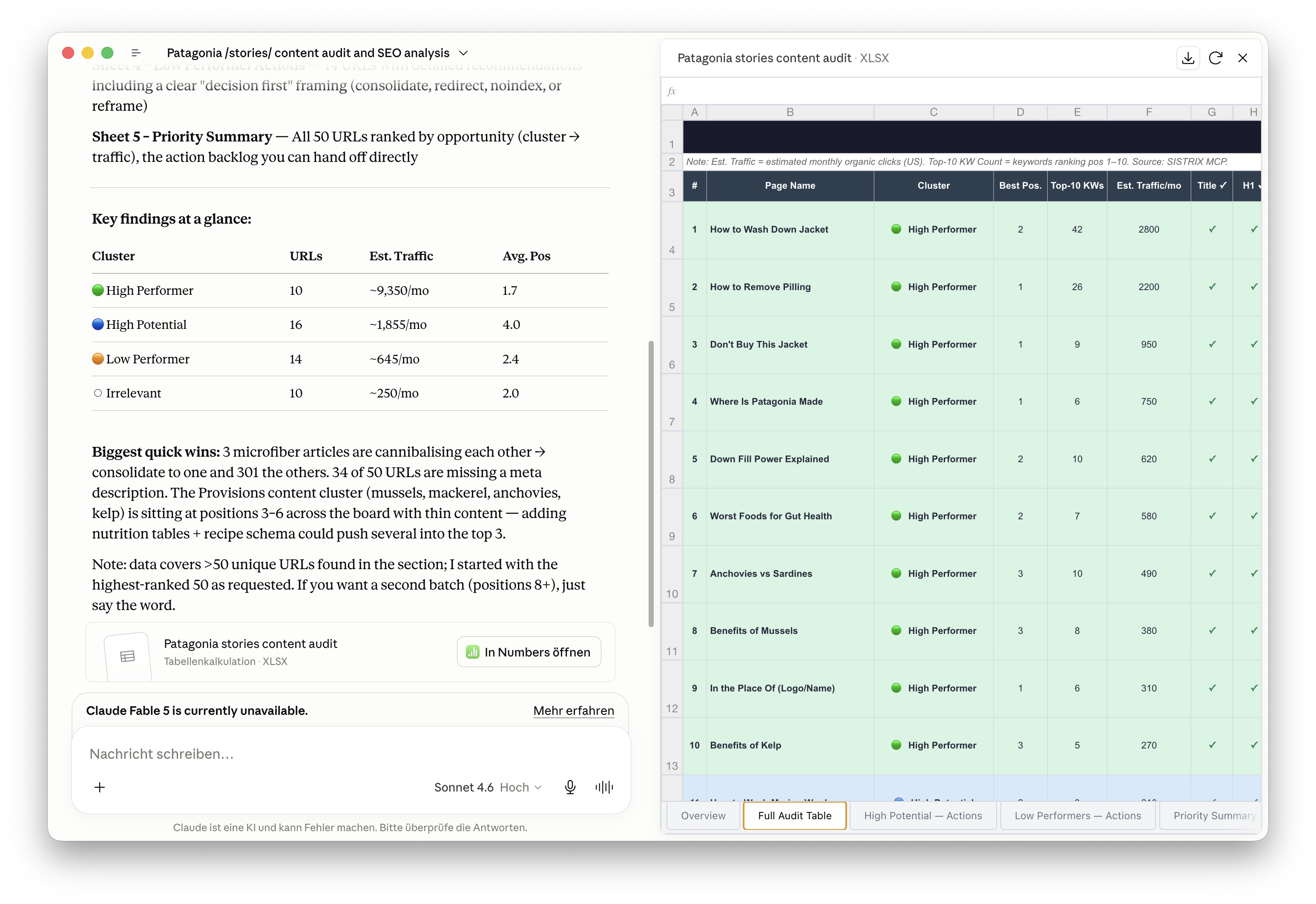
The table can be used directly as the basis for a content backlog, a client pitch, or internal sprint planning.
Combinations and Variants
Combination: Keyword strategy use case
Immediately after the audit, systematically expand the keyword gaps for “High Potential” URLs. The audit provides the prioritisation; the keyword strategy use case provides the specific mix of search terms.
- Variant: Competitor audit — Apply the same prompt to a competitor’s domain and directly compare which content performs better there.
- Variant: Technical issues only — Audit focused on missing titles, empty H1s, thin content, and noindex candidates (set url_score filter to < 20).
- Variant: Section-by-section sprint planning — Audit one directory section per month and transfer the results as a backlog into your project management tool.
- Extension: Crawl budget analysis — After identifying the “Unimportant” cluster, determine the total number of noindex-worthy URLs and quantify the potential crawl budget gain.
Stuck? Our support team can help with the SISTRIX MCP Server setup and answer questions about using it with Claude or ChatGPT. Contact support.
Test SISTRIX for Free
- Free 14-day test account
- Non-binding. No termination necessary
- Personalised on-boarding with experts





