
The AI Check now shows how AI systems talk about your brand and when it gets recommended, the AI Deep Dives get a chat feature, Prompt Research is available via the API and MCP Server, and the new navigation brings all tools together in one menu. Here is an overview of all the important SISTRIX updates from the third quarter of 2026.
- SISTRIX for AI/Chatbots
- AI Check: three new brand analyses, now across six AI systems
- AI Deep Dives: chat feature for targeted follow-up questions
- Prompt Research via API and MCP Server
- Onpage projects: analysing Shopify shops despite crawler throttling
- Try all the new features from the third quarter of 2026
- Review: the new features from the first half of 2026
- Outlook: what's coming next
More and more purchase decisions begin with a question to an AI system. Whether a brand is mentioned, recommended or overlooked is decided in the answers from ChatGPT, Gemini, Perplexity or the AI Overviews. Accordingly, our product development in the third quarter once again focused primarily on visibility in AI systems.
On top of that, there is broader access to SISTRIX data via the API and MCP Server, and a new navigation for the entire interface. We present all major new features on an ongoing basis in the SISTRIX Changelog. The quarterly review brings them together, along with a few smaller adjustments and new functions that did not get their own changelog entry.
One development outside our roadmap also deserves a mention here: Google is currently making it considerably harder for us and all other tools to collect data reliably. It started in September 2025 with the shutdown of the num=100 parameter, and most recently Goto URLs were added, through which Google redirects clicks to an internal address from which the destination cannot be read directly. We keep a constant eye on this and adapt our data collection accordingly. We report all relevant changes at status.sistrix.com.
SISTRIX for AI/Chatbots
In the AI/Chatbots area, two new features took centre stage: the AI Check and the AI Deep Dives.
AI Check: three new brand analyses, now across six AI systems
How a brand is perceived could previously be measured through surveys or social listening, for example, but not in the places where AI systems redefine a brand’s image every day. Three new analyses in the AI Check close this gap, for every brand and without needing your own project.
The sentiment analysis shows the balance of praise and criticism across all AI answers in which the brand appears, broken down by platform and topic and including a benchmark classification. The competitive perception analysis places the attributed strengths and weaknesses of all relevant brands side by side. The recommendation map records which brand is recommended for which purchase occasion and in which role: as first choice, as one of several options, not at all, or even with advice against it.
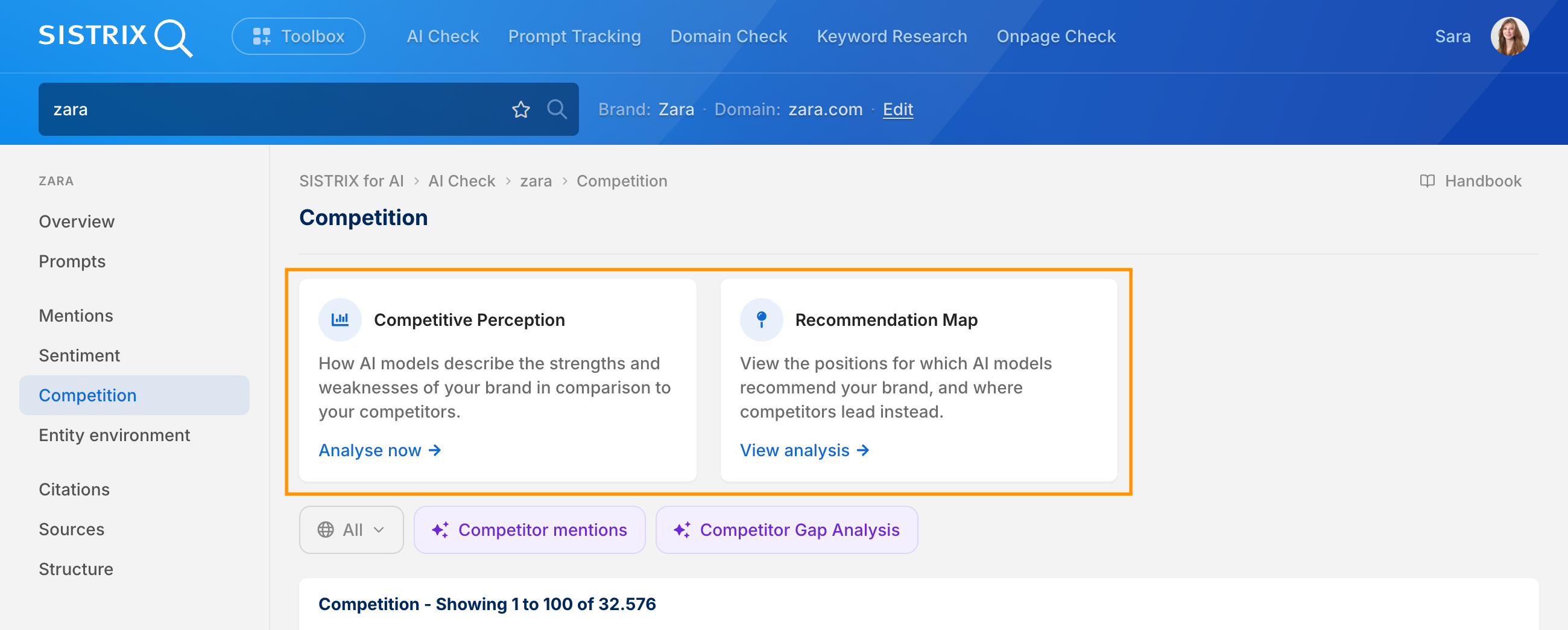
The data basis is crucial: none of the statements come from the model itself. Real AI answers to real user questions are evaluated, and every evaluative statement is extracted and calculated deterministically. For every result, you can display the original quote and the prompt that triggered it.
It is precisely this data basis that became significantly broader in the third quarter. The AI Check previously covered three AI systems, and now three more have been added:
- Gemini
- Perplexity
- Microsoft Copilot
Alongside ChatGPT, the AI Overviews and Google AI Mode, prompts, competitors and all three new analyses are now available for these systems as well. So you can see not only how your brand is talked about, but also where the picture differs depending on the platform. You can find out how the analyses work in detail in the Changelog. And if you want to see how to develop an action plan from them step by step, the Brand Gap Analysis tutorial takes you through it.
AI Deep Dives: chat feature for targeted follow-up questions
The AI Deep Dives from the second quarter combine deterministically calculated SISTRIX data with the interpretive strength of AI. What was missing so far was the next step: once an analysis was finished, there was no way to ask follow-up questions directly in SISTRIX.
That is now possible. Below every fully calculated Deep Dive, the input field “Ask me about this analysis” appears. The AI knows the full context of the evaluation, including the underlying data, and answers in concrete rather than general terms. A lot of criticism on one topic thus turns into prioritised actions instead of a mere stocktake.
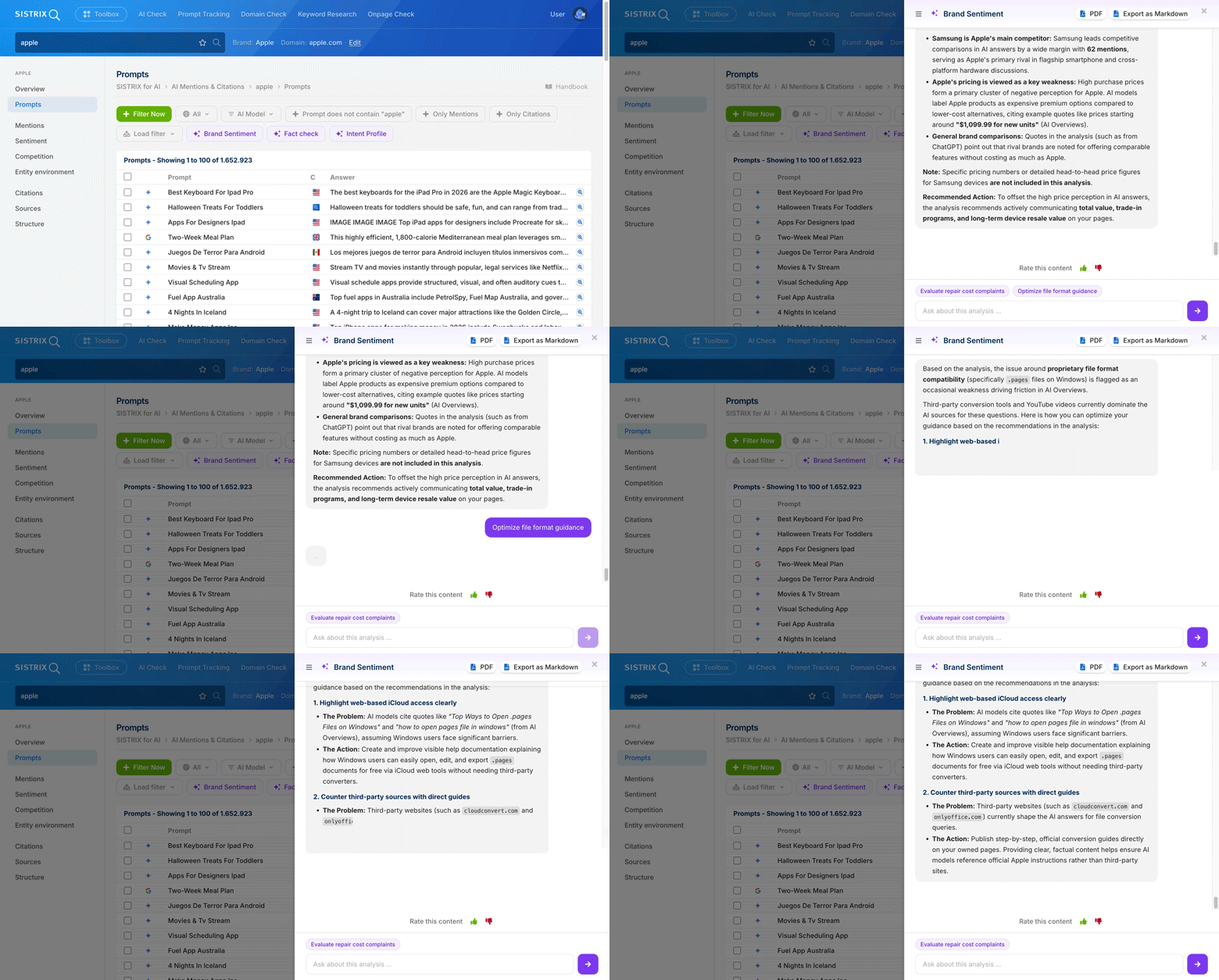
SISTRIX also suggests suitable follow-up questions itself: below the answer, suggestion chips with further questions about the respective analysis appear. More on this in the Changelog, and our tutorial on GEO analysis in five steps shows how several Deep Dives combine into a complete action plan.
We are already working on further AI Deep Dives for other areas of SISTRIX. Onpage projects will be first, and from there we will roll out the feature step by step. So that we can develop the Deep Dives in a targeted way, we would appreciate your rating: simply use the buttons below an AI result.
Prompt Research via API and MCP Server
With Prompt Research, we bundle real user prompts into topics, currently over 62 million user questions in more than 1.4 million topics. Until now, this could only be analysed directly in SISTRIX. Now the topic data is also available in the SISTRIX API and via the MCP Server.
The new ai.topicresearch area consists of three functions that lead from the overview into the detail:
- ai.topicresearch.overview: the aggregated picture for a keyword, with the number of topics, average dialogue length and the distribution across customer journey stages and intent groups.
- ai.topicresearch.list: the individual topics for the keyword, each with its metrics. The working basis for sorting, clustering and prioritising.
- ai.topicresearch.topic: a single topic in full depth, including buyer persona, emotional driver, next best action and the prompt library per AI model. The step that turns into a content briefing.
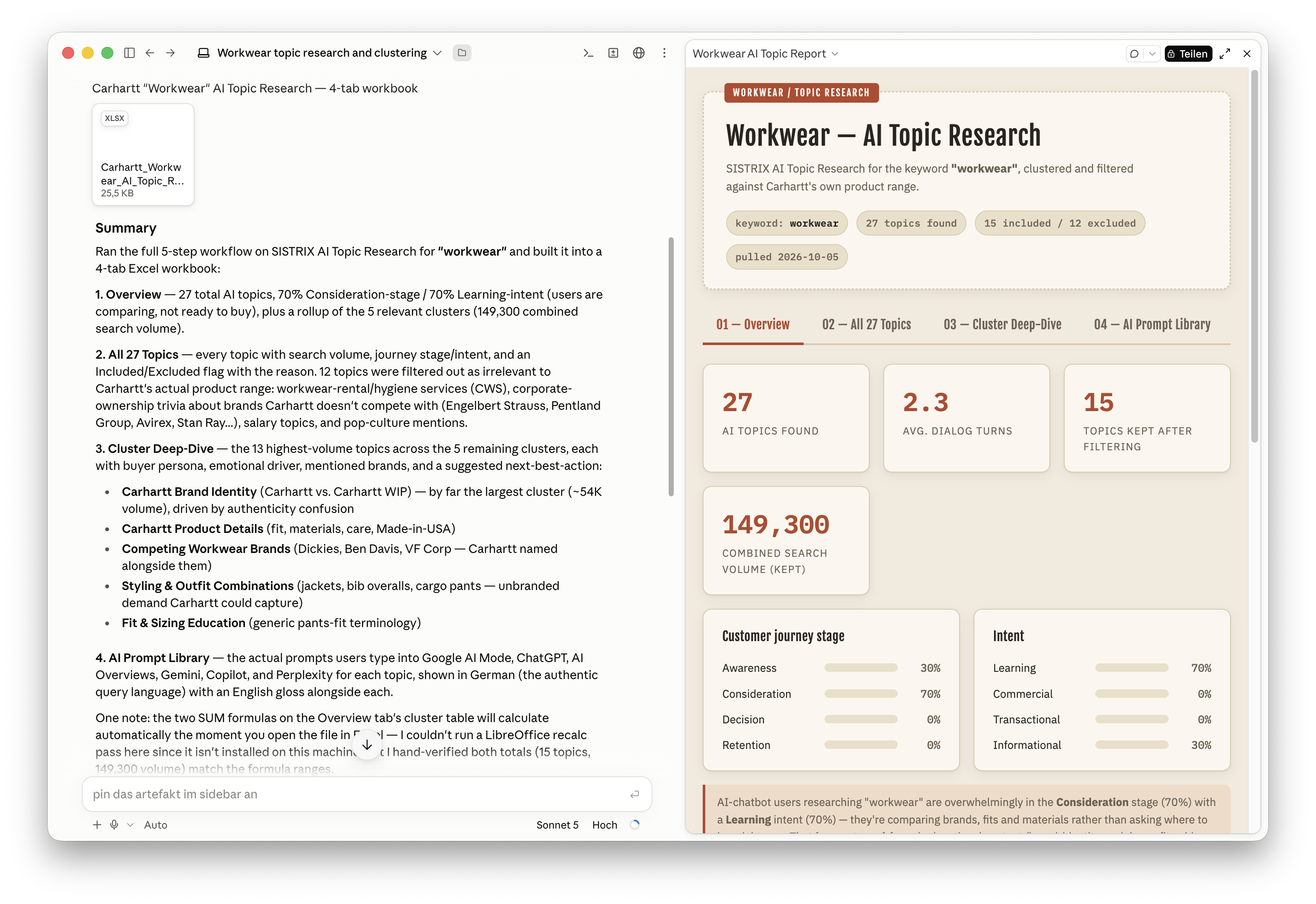
Via the API, you can use this to build your own reports and tools. Via the MCP Server, individual queries are no longer needed: you ask in the chat, and the chatbot retrieves the appropriate functions itself, from the topic list to clustering. You can see what this looks like played through in full in the Topic Prompt Research use case, and find all parameters in the Changelog and the API documentation.
New navigation: all tools in one menu
The previous navigation was built around views that you had to switch between: “For Google”, “For Amazon”, “For AI/Chatbots”. That fits less and less with how people work today. Anyone assessing visibility has long since stopped looking only at Google and a single domain: what matters now is the cross-system visibility and perception of an entire brand.
With the new navigation, we are taking a further step towards interlinking the tools: Google, Amazon and AI Search no longer have to be accessed separately but sit in one shared interface.
All SISTRIX tools now sit together in the navigation, grouped into five areas, each with its own colour and icon:
- AI Search: AI Check, Prompt Tracking and Prompt Research
- SEO: Domain Check, Keyword Analysis, Movers & Shakers, Onpage Check and Rank Tracking
- Content: Content Assistant, Content Planner and Content Discovery
- Amazon: Products, Sellers and Brands
- Workspace: Projects, Dashboards, Reports, Lists and API
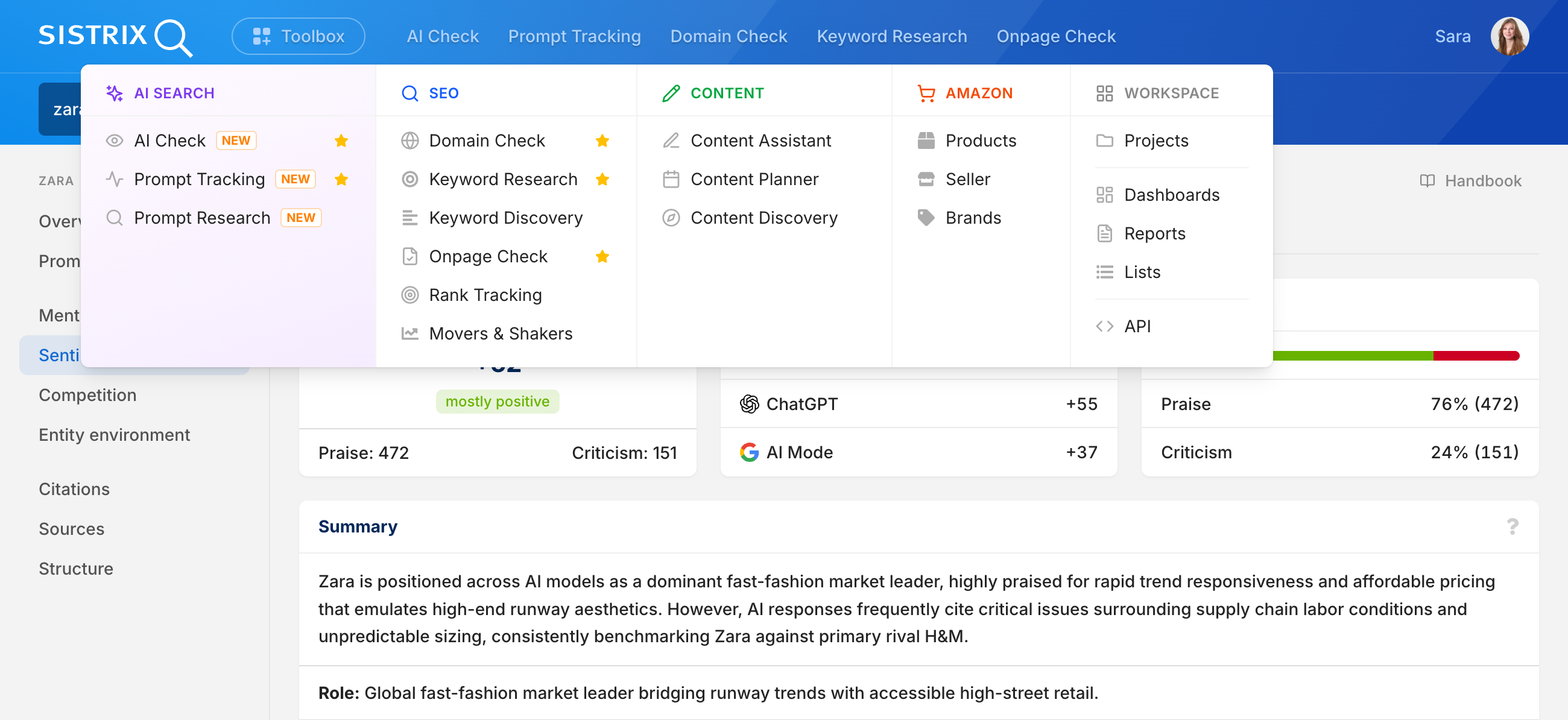
The practical effect is reduced click depth: for a cross-area analysis, you no longer switch views but jump directly from one tool to the next. Favourites are retained and can be permanently pinned to the top of the main navigation using the star icon, with up to ten possible.
The navigation is only the most visible part of a larger modernisation. Since the beginning of the year, we have been fundamentally overhauling the interface, with most of the work taking place behind the scenes, in the underlying technical system. You will notice the result mainly in one place: the entire interface runs noticeably faster. For us, the new system has a second advantage too, as it makes us significantly faster in product development. All the details are in the Changelog.
Onpage projects: analysing Shopify shops despite crawler throttling
Since May, Shopify has been slowing down crawlers it does not recognise, and this also affects the SISTRIX crawler. Anyone running an Onpage project for a Shopify shop has since seen incomplete or completely empty crawls, with no error message and no explanation. The reason: Shopify now requires proof that a crawler is authorised. Without this proof, requests are rejected or delayed.
There is now a solution for this directly in SISTRIX: in the expert settings of your Onpage project, you can store custom HTTP headers. What you need for this and how to set it up in Shopify is explained right next to the setting in the tool.
If you have not worked with Onpage projects so far: they let you continuously check the entire domain (or only specific sections of a site), from missing meta information and duplicate content to broken links and loading times, without a complicated setup. More on Onpage projects in a separate tutorial.
Try all the new features from the third quarter of 2026
The updates in the third quarter bring together what previously sat side by side: measuring mentions and citations becomes the question of how a brand is talked about and when it is recommended. Through the chat feature, a finished analysis becomes the next step. Via the API and MCP Server, the topic data from Prompt Research, which could previously only be analysed in SISTRIX, becomes the basis for your own reports and chatbot queries. And separate views become one navigation in which SEO, AI and content data sit side by side.
The three new AI Check analyses and the chat feature of the Deep Dives are part of the AI/Chatbot beta and are currently still free to use in all packages. The new navigation is already active in all accounts. ai.topicresearch is open in the API to all accounts with API access, and via the MCP Server to all active SISTRIX users.
Review: the new features from the first half of 2026
In the first and second quarters of 2026, much also revolved around the changed reality of search, from AI visibility and Onpage analysis to the API. As a reminder, here are the most important new features from the first half of the year at a glance:
- In Prompt Tracking, Google AI Mode can now be monitored alongside ChatGPT, Perplexity and the Google AI Overviews.
- Improved brand recognition ensures more precise data and fewer misattributions in AI answers.
- The Onpage projects were comprehensively revised, including tag-based comparisons in the project Visibility Index, new error detection and a live log during the crawl.
- The Data Studio Connector integrates the entire SISTRIX API, including AI visibility data, into Google Data Studio without code.
- The new main navigation started in SISTRIX Labs and has been rolled out to everyone since September.
- Prompt Research brought keyword research for AI search, including search volume for AI search, intent and customer journey stage per topic.
- In Prompt Tracking, the AI suggests suitable tags, and by linking domains with brands, citations can now be measured in addition to mentions.
- The AI Deep Dives combine deterministically calculated SISTRIX data with AI interpretation, launching with eleven analyses in the AI Check and in Prompt Research.
- With the switch to OAuth, the MCP Server is open to all SISTRIX users, without an API key and without API credits.
- The SISTRIX API was extended with
domain.pathsanddomain.hosts, anddomain.urlcount.seomade a comeback.
Outlook: what’s coming next
In the fourth quarter, too, we are keeping up the pace. In addition to the further AI Deep Dives already mentioned, which we will bring step by step to other areas of SISTRIX, we are fundamentally overhauling the Reports. They are partly outdated and, in places, unnecessarily inflexible. Using them will therefore become more intuitive, the design more modern, and entirely new functions will be added. And there will be further design adjustments in the Toolbox as well.
As always, we look forward to your feedback! Praise tells us we are on the right track, and critical feedback helps us make SISTRIX even better. And if there is a particular function you would like, feel free to send us your feature requests via our support team at support@sistrix.com. We cannot guarantee implementation, but we are always happy to build in smaller things that are easy to implement. And when many users face the same problem, we also add larger functions to our planning.
Test SISTRIX for Free
- Free 14-day test account
- Non-binding. No termination necessary
- Personalised on-boarding with experts