From an overview of a keyword down to an individual topic with buyer persona and prompt library. With three new features, the data from Prompt Research is now also available in the SISTRIX API and via the SISTRIX MCP Server.
We recently switched the SISTRIX MCP Server to OAuth, opening it up to all SISTRIX users without needing an API key. Now three new features are being added that make working with the API and MCP Server even more comprehensive. Via the MCP Server, a chatbot like Claude can evaluate the data directly for you — for example, for a complete content research project on a topic. Via the API, you can build your own automated reports or tools with it.
What Prompt Research delivers
In classic Google search, demand was an easily measurable quantity. A keyword has a monthly search volume, and content can be planned around that. In AI search, this metric no longer exists, because users don’t type in clear-cut keywords but instead describe their situation in their own words. A large share of these prompts are unique.
That’s why, with Prompt Research, we collect real user prompts from various AI platforms and group them into topics. A topic combines all the differently worded questions that point to the same underlying need, across platforms. The foundation is more than 62 million user questions across more than 1.4 million topics.
Each topic has its own metrics: search volume, dialogue length, intent, and customer journey stage. On top of that are strategic fields such as buyer persona and emotional driver, as well as real user prompts per platform.
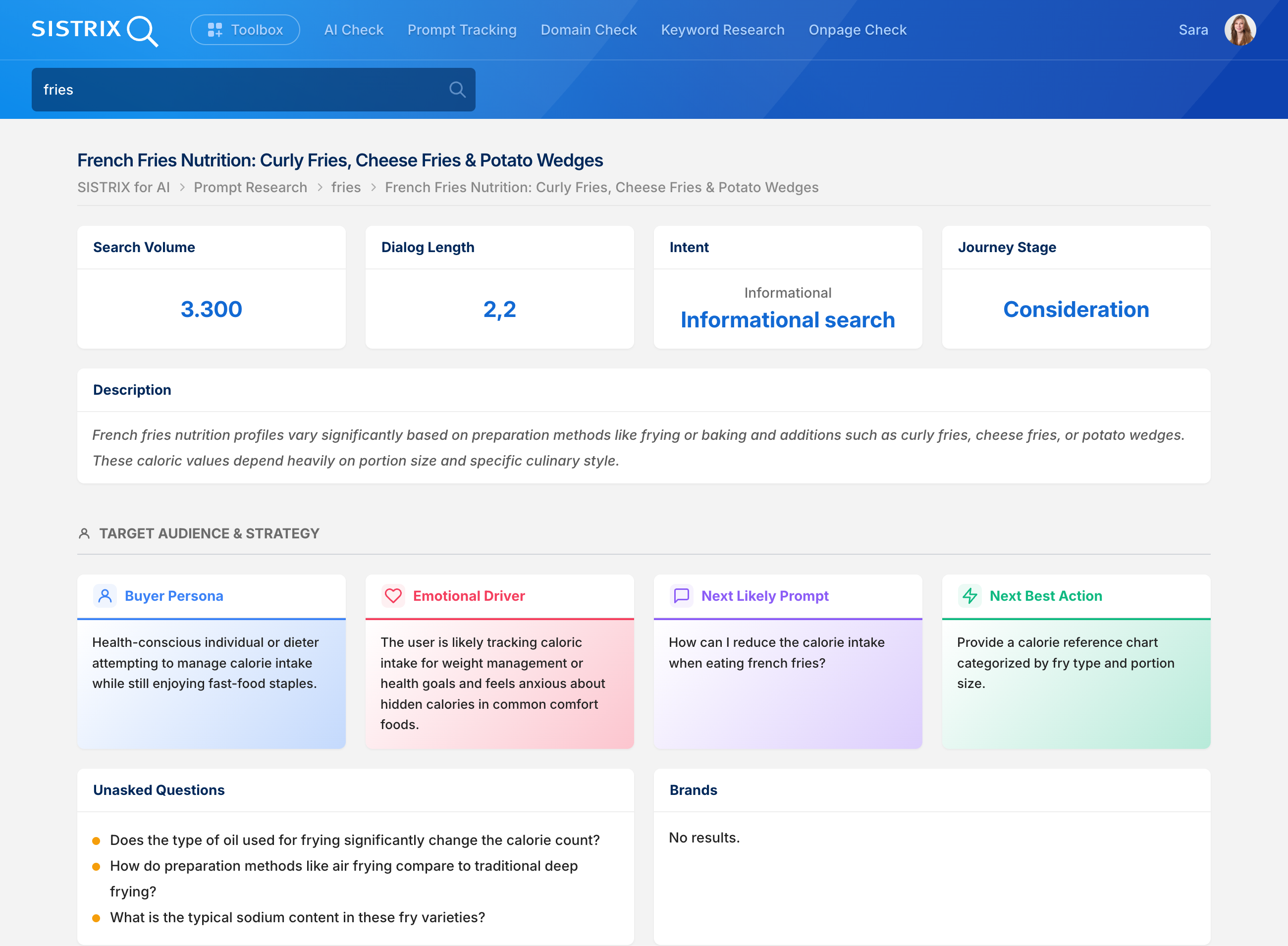
Until now, all of this could only be analyzed directly within SISTRIX. That’s exactly what’s changing now: the topic data is available as of today in the SISTRIX API and via the SISTRIX MCP Server. Via the MCP Server, you can have a chatbot like Claude carry out the complete research for you, including clustering and filtering for your own brand. Via the API, the data can be integrated into existing internal reports, for example.
Three new features in the API and MCP
The new ai.topicresearch section consists of three API functions that move from overview to detail. Those working directly with the API can call them individually or in sequence, as needed. Via the MCP Server, this isn’t necessary: you simply ask in the chat, and the chatbot retrieves the appropriate functions in the background itself. The use case below shows exactly what that looks like in practice.
- ai.topicresearch.overview: The aggregated picture for a keyword. Number of topics, average dialogue length, and the distribution across customer journey stages and intent groups. This lets you clarify upfront whether a topic is large enough and whether demand tends to be informational or closer to purchase.
- ai.topicresearch.list: The individual topics for the keyword, each with their metrics. Your working basis for sorting, clustering, and prioritizing.
- ai.topicresearch.topic: A single topic in full depth, including the fields buyer persona, emotional driver, next best action, and the prompt library per AI model. This is the step where a content briefing is born. Each topic from ai.topicresearch.list carries a topic_label for this purpose — a unique identifier used to retrieve exactly this topic in detail, for example “French Fries Nutrition: Curly Fries, Cheese Fries & Potato Wedges.”
For your own automation, the list can also be filtered and paginated by intent and customer journey stage. All parameters and the complete documentation of the response are available in the API documentation.
Use case: from topic list to content briefing
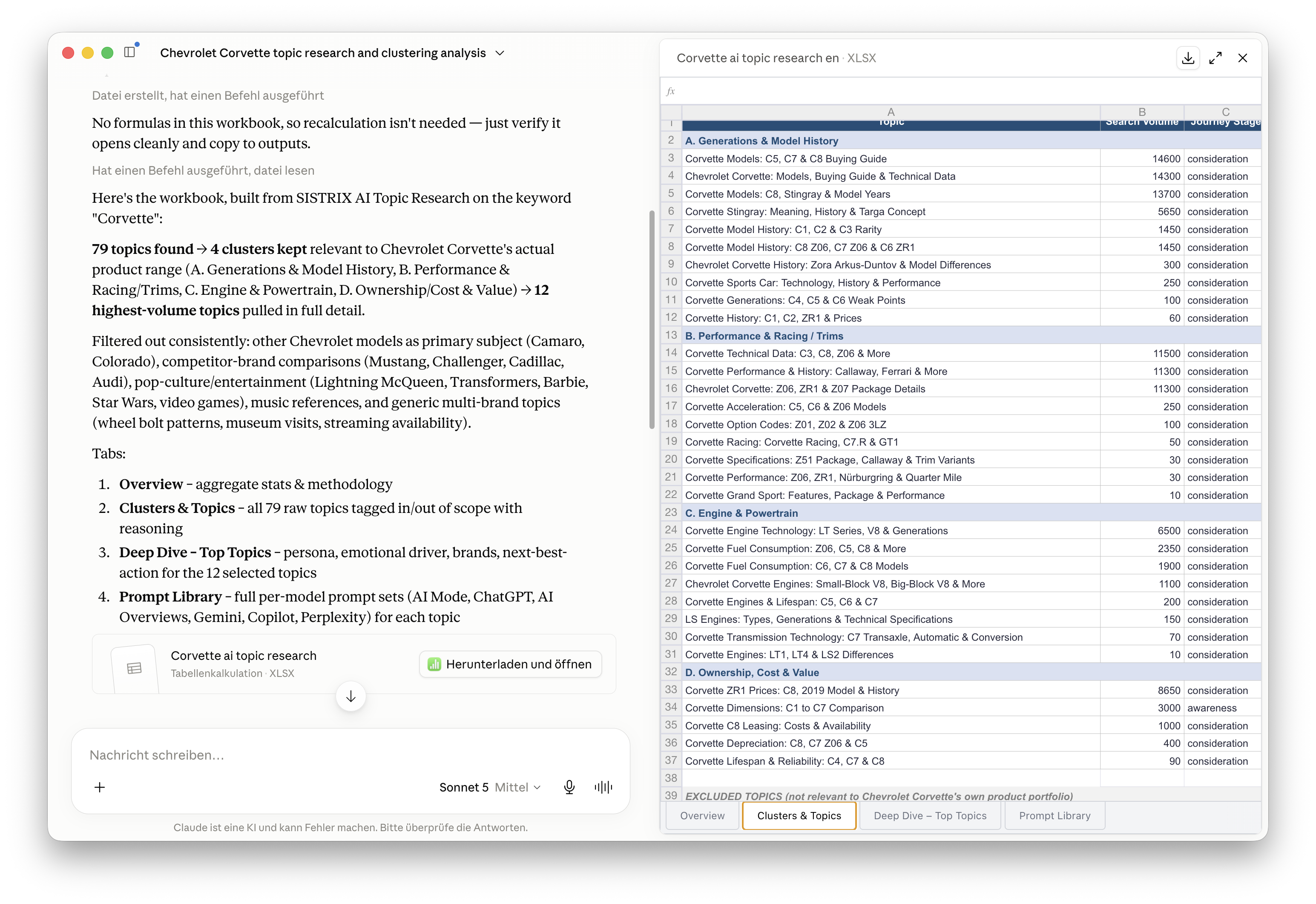
Via the MCP Server, you don’t need to build this workflow yourself — the model takes care of it. In the Topic Prompt Research use case, we walk through it completely: from the topic overview through clustering to filtering down to what your own brand actually sells. How the three functions interact is laid out there step by step. A ready-made prompt and a sample analysis as an Excel file are also included.
Available via the MCP Server for all SISTRIX accounts
In the SISTRIX API, ai.topicresearch is open to all accounts with API access. Via the SISTRIX MCP Server, the section is usable by all active SISTRIX customers.
As always, feedback is welcome at support@sistrix.com.
Have fun trying it out!